Posts

Showing posts with the label how to pay signals

How to pay by card in MoonPay?

Image
  MoonPay offers a fast and easy way to buy and sell cryptocurrencies. You can buy cryptocurrency with a credit card, bank transfer, or Apple Pay. With MoonPay, you can pay for a vfxAlert license with a PRO card, and you do not need to have your own cryptocurrency wallet. MoonPay automatically creates a crypto wallet and exchanges fiat currency for cryptocurrency from your card. Detailed instructions can be found on our website when purchasing a license via MoonPay

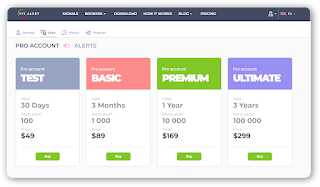
Discounts on all new tariffs!

Image
  You can buy any tariff for vfxAlert PRO license at a discount. Discounts up to 50% on all tariffs are valid until April 30, 2022. Pay attention to the Ultimate tariff. This tariff includes access to two applications at once: vfxAlert and xSignals. For one price you get three types of signals: binary options signals, forex signals and crypto signals. Only now the Ultimate tariff with a 50% discount To get a discount follow the link https://vfxalert.com/store?promo=AFJiU1Gg  Or use a promocode "AFJiU1Gg" when purchasing a PRO license

How to pay for vfxAlert signals using Perfect Money?

Image
In this article, we will tell you how to buy signals using Perfect Money. We will also look at the algorithm of how to buy signals with cryptocurrencies using Perfect Money. You can pay for a PRO license for vfxAlert signals in the store on the official website Do not purchase a vfxAlert PRO license from other sites as this comes with a high risk of losing your capital. How to pay for the vfxAlert license using the Perfect Money payment method. Follow step by step the instructions below. Step 1.  Create a Perfect Money Wallet. Go to the site https://perfectmoney.is  in the Sign-Up and fill in the fields. The completion of registration will be Your personal Member ID sent by email. Step 2.  Go to the vfxAlert website in the Store and choose a tariff. Step 3.  Choose the payment method Perfect Money and click “Make a payment” Step 4.  Choose the desired payment method Step 5. Write your wallet details and click “View payment” Step 6. Choose an account for payment ...